
The weekly menu that plans itself.
One tap and you know what you're eating this week, matched to your diet. One more and the ingredients land on a shopping list the whole family can see.
The app itself is in Hungarian for now, and so are the screenshots. English is coming.
Less head-scratching.
More dinners together.
Wukie takes care of “what should we eat?” and “what do we need from the shop?”. The cooking stays yours, but nobody has to argue about the planning anymore.
One tap, and the week is done.
No more racking your brain every evening about dinner. It fills the week with meals that fit your diet. If you like, it only picks from your favourites, and whatever the family asked for gets in too. Under each day you can see how many calories it adds up to, compared with your goal.
Live, together.
No more “anything else we need?” calls. Whatever you add at home shows up right away for whoever is in the shop.
Swipe right if you like it.
Everyone flicks through the recipes: right if you like it, left if you don't. Whatever everybody likes goes into your shared cookbook.
Allergies can't be switched off.
If someone in the family is allergic to something, a meal with it won't even make it into the plan, and there's no setting to change that. Still check the label in the shop, because ingredients can differ from brand to brand.
Cooking, step by step.
This is what I missed the most. First it tells you what's coming and what to get out. Then it goes step by step: what to measure, what's next, and what you can do while you wait. The timer lets you know when time's up. Instead of “season to taste” it tells you how much salt and pepper to start with. If you need the oven, it shows which setting and how many degrees.
So you don't forget what's on today.
Meals on the left, to-dos on the right, like a paper planner. Dentist, bills, workout: you write it down for the day it's due, even weeks ahead.
What's this dish?
Saw something tasty somewhere? Take a photo and it tells you what it is. If you have a similar recipe, it finds it. If not, it writes one.
One plan for the whole family. Even if you don't all eat the same.
Invite your family, and everyone sees the same weekly plan and shopping list on their own phone. Meanwhile everyone gets their own portion and their own diet.
A quick look inside.
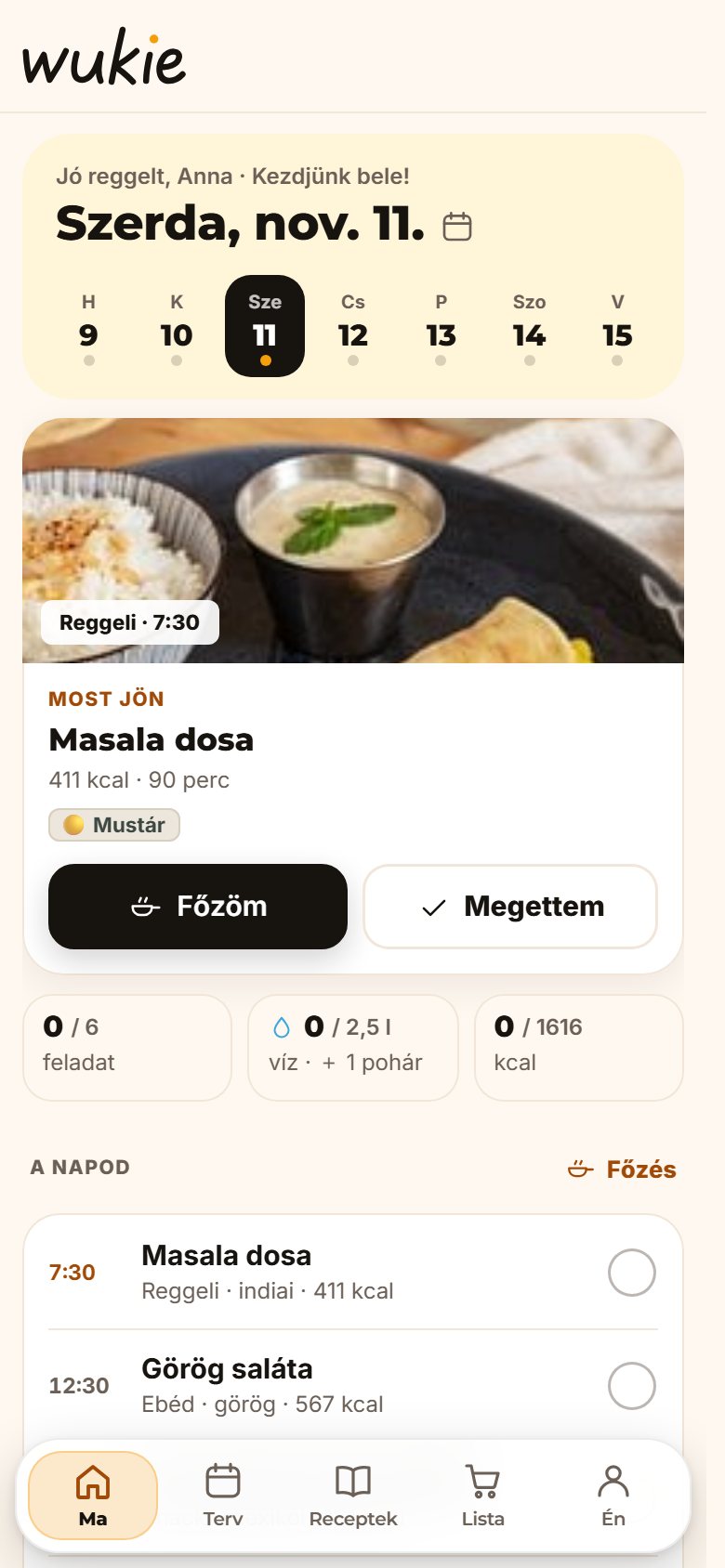
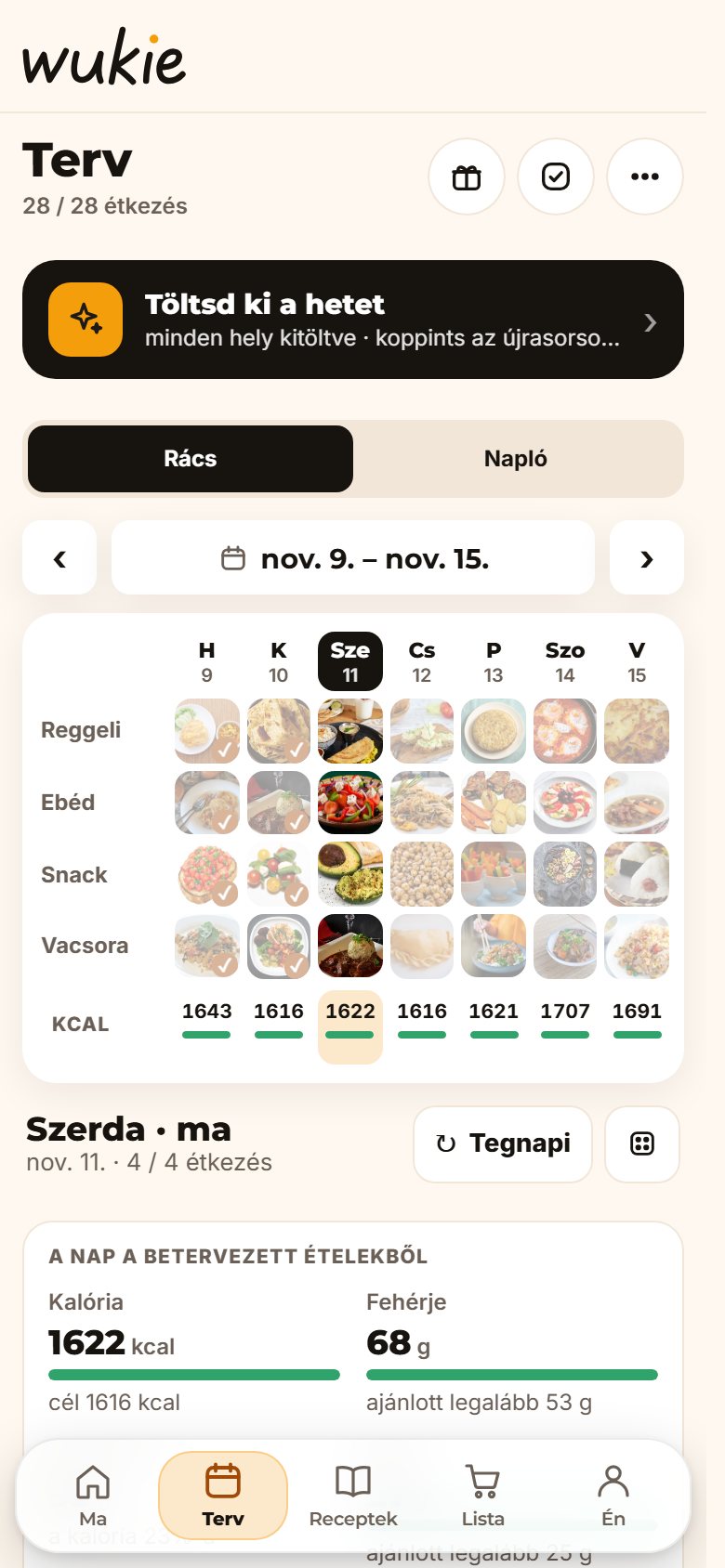
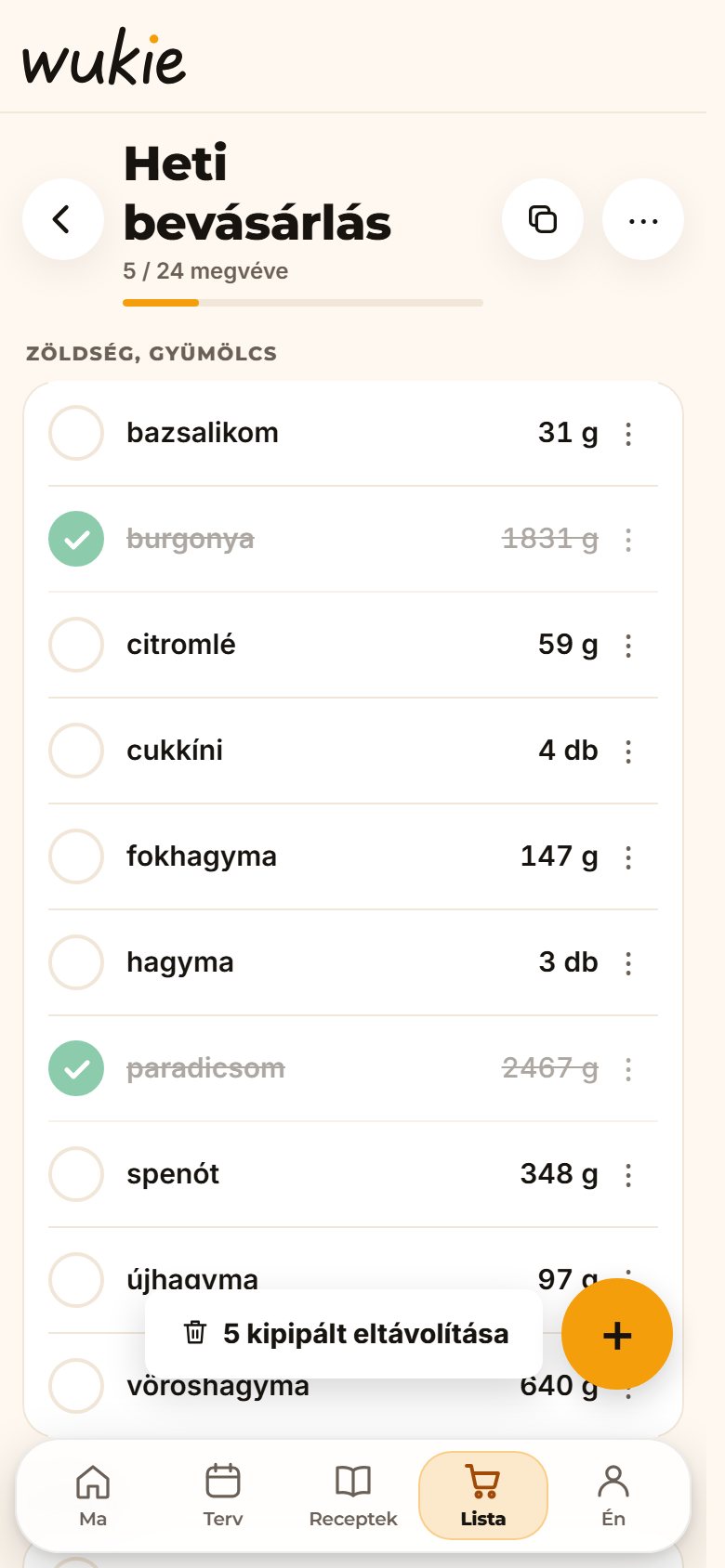
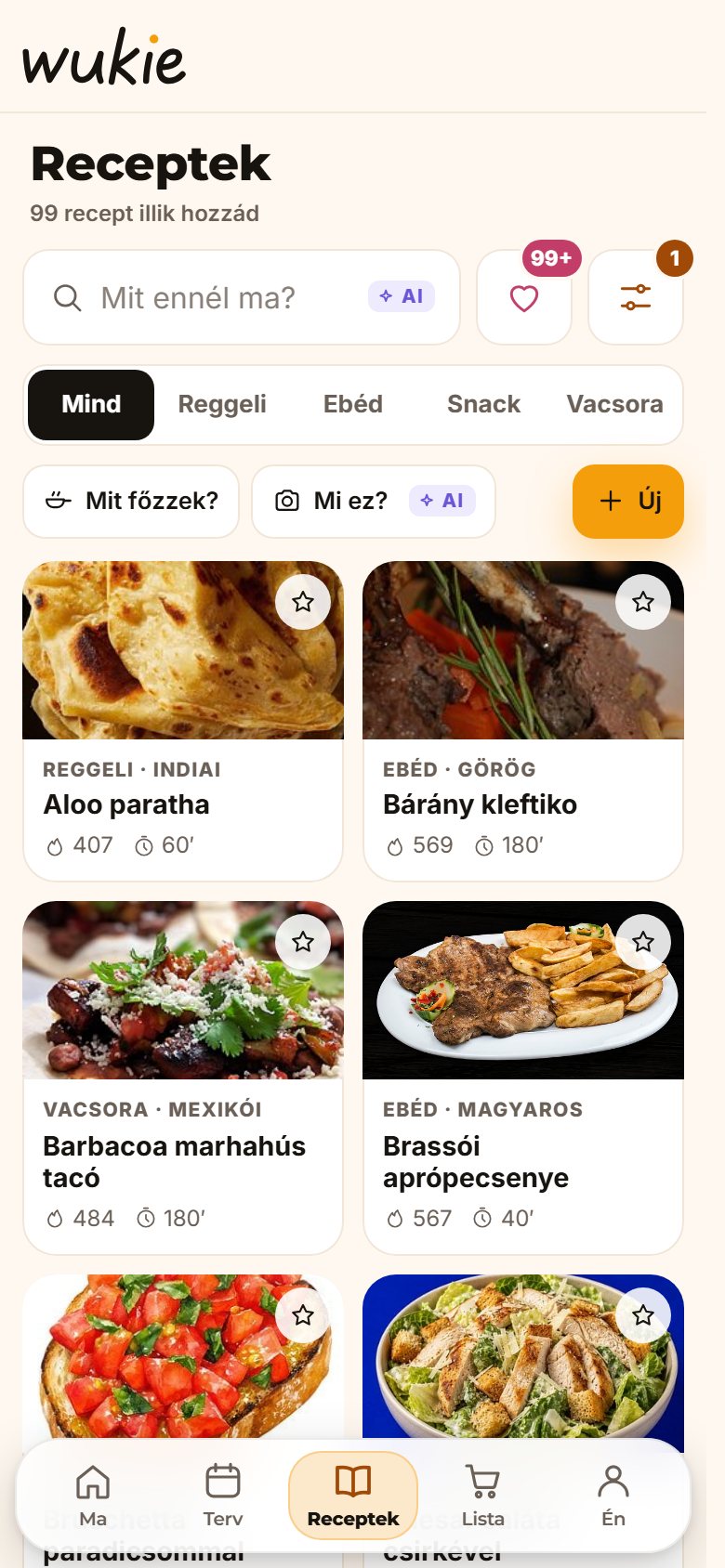
What people
miss elsewhere.
I looked into why people give up on apps like this. These came up the most, so these are the things I paid attention to.
It picks from the recipes that suit you, and doesn't bring back what you've already had that week. You can say what should be in it (like whatever needs using up in the fridge), which cuisine to pick from, and that you'd like cheaper ingredients.
When you fill the week, you pick the days and say how many times you'll cook. You can see straight away which cooking covers which days.
If a meal shows up on several days, you can swap all of them at once. Or select several meals in the week and reshuffle them with one tap.
Here an allergy isn't a setting, it's a rule. Anything that's bad for someone in the family stays out of the plan.
Here you just start after the questions. You don't have to pay for that.
Half a spoon, a pinch, one whole egg. You get amounts you can actually measure, and how much salt to start with. While you cook, the step shows how much of the thing you're adding right now.
Less common kitchen words and ingredients are underlined. Tap one and it explains it in a sentence, and for ingredients, where to find it in the shop.
Next to the heat level, a small sign shows roughly what number to turn the knob to, and how high on gas. Same for the oven: the temperature and the symbol on the dial.
For meat, fish and eggs, at the step where it's done, it shows what it should look like and what temperature it should be inside. If it's not there yet, it tells you what to do.
It works it out for however many of you are eating. If you cook for two days at once, it also tells you what goes in the fridge and what goes in the freezer.
Everyone counts with their own portion. If someone eats something else that day, or isn't home, the shopping list knows.
Open it and the next meal is right there. If there's no plan yet, you can fill it in with one tap, or see what you can cook from what's already at home.
Paste the link to the recipe page, and on most sites it fills in the ingredients and the steps for you. It does this without AI, for free.
Take a photo of the plate, and AI estimates what's on it and how much. If you also weighed it, it gets more precise from the weight.
On a tablet there's a weekly board view too: one column per day with meals, to-dos and appointments. Put it up in the kitchen and tick things off there.
You don't have to log every bite. What you planned, it already knows. The rest is one tap.
Under the Plan grid, each day shows the planned calories with a small bar, compared with your goal. Tap the day to see protein, carbs and fibre too.
Swipe the item on the list and it shows what you can use instead. If it's just not the same without it, it suggests a different recipe.
You can write down your own kitchen tips and add them to recipes. While cooking, you'll see them at the step where they matter. The recipe itself doesn't change, and you can take the tip off any time.
There is, and not just for the last step. While the app is open, everything from the last 24 hours is in a list, and you can pick which one to undo.
You can ask for
reminders.
You can turn them on at the end of the questions, or later. If you don't need one, you won't hear from it.
If it's afternoon and you're only on your second glass, it gives you a nudge. It counts in glasses, and if you don't know how big yours is, a photo is enough.
If you sit a lot, it reminds you during the day to stand up and stretch. It takes half a minute, and the screen shows you how.
In the evening you write one sentence about something that felt good today. Small thing, but nice to read back later.
If you don't want to count calories, the numbers can disappear. Your portions are still made for you.
You don't have to weigh yourself. If you'd like to, you can see where your weight is heading. If not, it never comes up.
Orange, Ocean, Sage, Rose or Graphite. Each one works in dark mode too, with its own shade.
On Sunday evening you can look back at what went well, and fill in the next week right there.
A few quick questions, and it's made for you.
A few questions
What's your goal, how much do you move, what can't you eat. That's what your meals and portions are based on, and it doesn't ask for money before you can start.
Fill in the week
Let it pick with one tap, or choose yourself. You can swap anything or move it to another day.
Off to the list
The ingredients go on the shopping list, for however many of you are eating. In the shop all that's left is ticking things off.

It started in my own kitchen.
I originally made Wukie for myself and my partner. I'm not a very experienced cook, and I never understood what “season to taste” actually means. My memory isn't great either: some things stick easily, but cooking and baking are not among them. 😃
I built myself a little helper, then kept adding answers to everyday questions. What should we eat? What do we need for it? How do I make it? And what else did I want to get done today?
It also bothered me that whenever I looked up any kind of diet, there was a quiz and then straight away a payment screen. Wukie tries to turn that around a bit. The questions really are useful for getting to know you, but afterwards you don't have to pay right away to start using it and get recipes and portions made for you.
The AI features started as an experiment too: I wanted to see what it could actually recognise, and in which situations. What could we eat from what's in the fridge? How can a dish from a photo be rewritten if it doesn't fit someone's diet? Then I got a little carried away, and I think they turned out to be genuinely useful.
This is more of a project than the product of grand dreams. I'm happy if it's useful to someone else too, and helps with the everyday planning.
Questions people ask
Is it in English?
Not yet. The app, the recipes and the screenshots on this page are in Hungarian for now. An English version is coming, starting with the app itself.
Can I use it together with my family?
Yes. In a household the weekly plan, the shopping list and the to-dos are shared, everyone on their own phone, live. Your weight and your journal stay yours.
Does it work without a diet?
Yes. If you just want to plan and shop, choose “I don't have a particular goal”. Then there's no calorie counting.
What's the “balanced plate”?
It's based on the Hungarian healthy-eating guide, a lot like the healthy plate models other countries use. If you pick it, you get meals with plenty of vegetables and fruit, and without processed meat or lots of oil.
Who can see my data?
Your weight, your journal and your goals are yours only. The members of your household see the shared plan and list, and, to keep everyone safe, your allergies too.
Does it give medical advice?
No. Wukie helps with planning and shopping, and the calories and nutrition values are estimates. If you're ill or need a special diet, ask your doctor or dietitian.